
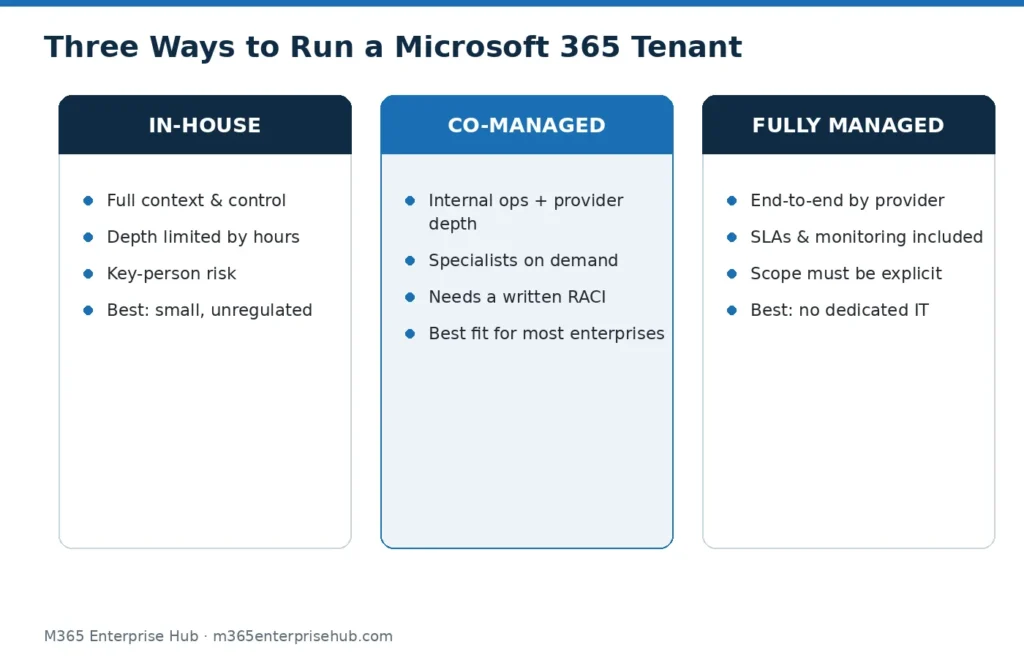
There are three ways to run a Microsoft 365 tenant: build an in-house team, hand it to a managed services provider, or split the work between the two (co-managed). The right answer depends on three variables — the depth of Microsoft skills you can hire and retain in the UAE market, the security and compliance exposure of your industry, and whether tenant administration is genuinely a full-time job at your size.
This comparison lays out what each model actually costs and risks, so the decision is deliberate rather than inherited.
What “Administering Microsoft 365” Actually Involves
The honest starting point: tenant administration is several jobs wearing one badge.
- User and license management — joiners, movers, leavers, license assignment and reclamation
- Identity and access — Entra ID, Conditional Access maintenance, MFA, privileged role reviews
- Security operations — Defender alert triage, policy tuning, incident escalation
- Compliance configuration — retention, sensitivity labels, DLP in Purview
- Collaboration governance — Teams and SharePoint lifecycle, guest reviews
- Change management — evaluating the continuous stream of Microsoft feature changes
An in-house generalist can cover the first item well, the second partially, and the rest rarely — not from lack of ability but lack of hours. That gap is where tenants drift.
The In-House Model
Where it wins: organizational knowledge. An internal administrator knows the business, sits inside its politics, and responds to leadership directly. There is no scope document — everything is implicitly in scope.
Where it strains: depth and continuity. One or two people cannot be experts across identity, security operations and compliance simultaneously; the UAE market for senior Microsoft security skills is competitive; and a single resignation can remove the entire knowledge base overnight. Cost is not just salary — it’s training, certification renewal, and the risk premium of key-person dependency.
The honest cost picture: for a mid-sized organization, a capable in-house Microsoft 365 function is at minimum one dedicated senior hire plus backup coverage. We won’t quote salary figures — they move constantly — but the comparison to make is total employment cost of that coverage versus a managed contract covering the same scope with a bench behind it.
The Managed Model
Where it wins: depth on demand and continuity. A managed Microsoft 365 engagement gives you access to specialists across identity, security and compliance without employing each specialty, plus documented SLAs and no key-person risk. Security monitoring — the function most in-house teams silently skip — is contractible with defined response times.
Where it strains: scope boundaries and distance from the business. Anything outside the contract is a change request; a poor provider hides behind ticket queues; and you must manage the provider — an unmanaged managed service drifts too. The evaluation questions that separate good providers from ticket-takers are covered in our managed services guide linked above.
The Co-Managed Middle
Most UAE enterprises we assess land here. Internal IT keeps what it is genuinely good at — user support, business relationships, day-to-day administration — and the provider takes the specialist load: identity governance, Defender/Sentinel monitoring, Purview configuration, and escalation depth. The critical success factor is a written responsibility split (a RACI), because co-managed without one means both sides assume the other reviewed the alerts.
Decision Framework
| Your situation | Indicated model |
|---|---|
| Under ~200 users, no regulated data, one capable IT generalist | In-house, with an annual external health check |
| Regulated industry (banking, healthcare, government) or PDPL-sensitive data at any size | Managed or co-managed — security monitoring should not be a part-time duty |
| Existing IT team, but security/compliance features unconfigured | Co-managed: keep operations in-house, contract the specialist layers |
| No dedicated IT function | Fully managed |
| Rapid growth, M&A, or a KSA expansion coming | Managed or co-managed — spikes are absorbed by the provider’s bench, not your headcount |
Risk, Stated Plainly
The largest risk in the in-house model is not incompetence — it’s the unmonitored alert. Defender raises a signal, nobody owns triage, and the incident is discovered by its consequences. The largest risk in the managed model is scope theatre — paying for “management” that amounts to license administration while security and compliance sit untouched. Both risks are addressed the same way: define, in writing, who watches what, and audit it twice a year.
A Microsoft 365 services provider should be willing to show you exactly which of the six job families above they cover, at which service level — before you sign. If the answer is vague, the risk is yours, whichever model you chose. See the full scope of our Microsoft 365 services for how we split those layers.
Frequently Asked Questions
Is managed Microsoft 365 only for companies without IT teams?
No — co-managed arrangements exist precisely for organizations with IT teams. The provider covers specialist depth; the internal team keeps operations and context.
What should a managed contract explicitly include?
Named workloads in scope, response and resolution targets by severity against the UAE working calendar, security monitoring hours, privileged access control, the change-request process, and exit terms including handover of Global Administrator access and documentation.
Can we switch models later?
Yes, in either direction. The tenant belongs to your organization regardless of who administers it. What makes switching painful is undocumented configuration — insist on documentation as a deliverable from day one, in-house or managed.
How do we compare costs fairly?
Compare total employment cost of the in-house coverage you would actually need (including backup and training) against a contract covering the same written scope. Comparing one administrator’s salary against a full managed scope understates the in-house side.