
Microsoft Teams governance is the set of rules and settings that control how teams get created, who can join them, how they’re named, how long they live, and what happens to their data. Without it, Teams grows organically until nobody knows which team is current, who the external guests are, or where sensitive files ended up. With it, Teams stays searchable, secure and auditable.
This guide covers the five decisions every governance setup starts with. None of them require third-party tools — they are configuration choices inside Microsoft 365 you may already own.
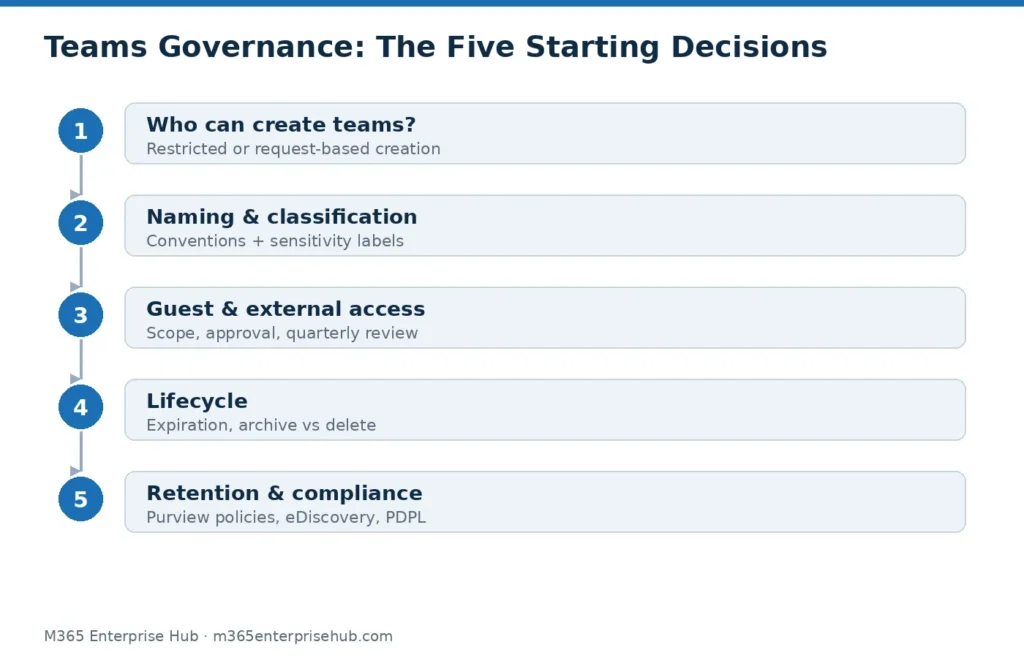
Decision 1: Who Can Create Teams?
By default, every user can create a team — and every new team silently creates a Microsoft 365 Group, a SharePoint site and a shared mailbox. That default is the root cause of sprawl.
Your options, from loosest to tightest:
- Open creation with lifecycle rules cleaning up behind it (workable for small organizations)
- Restricted creation to a security group (department leads, project managers)
- Request-based creation via a form or approval flow, so every team has a stated purpose and owner before it exists
For most UAE enterprises we see, restricted creation with a lightweight request process is the balance point: creation stays fast, but nothing appears without an accountable owner.
Decision 2: Naming and Classification
A team called “Project X” tells you nothing in year two. A naming convention — for example DEPT-Purpose-Year — makes the directory self-explanatory, and Entra ID supports enforced prefixes and blocked words so the convention applies automatically.
Classification matters more than naming: label each team public, private or confidential at creation. Those labels can then drive behaviour — a confidential team can block guest access and external sharing automatically through sensitivity labels, which connects Teams governance to your wider Purview information protection and DLP setup.
Decision 3: Guest and External Access
This is the decision with real security weight. Two separate controls are often confused:
- Guest access lets a named external person join a team as a member, with access to its files and conversations.
- External access (federation) lets your users chat and call with people in other organizations without membership.
Neither is inherently unsafe — collaboration with clients and suppliers is why Teams exists. The governance question is scope: which teams may have guests, who approves them, and when are they reviewed and removed? A quarterly guest review is the single highest-value habit in Teams governance; stale guest accounts are the classic audit finding.
Decision 4: Lifecycle — Teams Must Be Allowed to Die
Every project team should have an end. Without lifecycle policy, your directory fills with dead teams that still hold live data and live guests.
Configure expiration policies so team owners must actively renew inactive teams, and define what “end” means: archive (read-only, preserved) versus delete (subject to retention). Archiving preserves the record; deletion without a retention policy destroys it — which leads to the last decision.
Decision 5: Retention and Compliance
Chats and channel messages are business records. Retention policies decide how long they’re kept and when they’re disposed of, and eDiscovery makes them searchable when legal or a regulator asks. For UAE organizations subject to the Personal Data Protection Law (Federal Decree-Law No. 45 of 2021) or sector regulators, “we can’t produce those messages” is not an acceptable answer.
Retention is configured in Microsoft Purview, not in Teams itself — one more reason governance is a tenant-wide discipline rather than an app setting. If your whole tenant has grown without rules, a broader tenant governance and optimization review is the right starting point.
Where to Start This Month
- Export the list of existing teams, owners and guests — you cannot govern what you haven’t counted.
- Fix ownership: every team needs at least two owners.
- Turn on expiration for inactive teams.
- Agree the naming convention and creation rule going forward.
- Schedule the first quarterly guest review.
That sequence stabilizes the environment before any policy debate. The full framework — including adoption, so governance doesn’t strangle usage — is covered in our Microsoft Teams Governance & Adoption services.
Frequently Asked Questions
Is Teams governance a product I have to buy?
No. The core controls — creation restrictions, naming policy, expiration, guest settings, retention — are features of Microsoft 365 and Entra ID. Some, like enforced naming policy, require specific license tiers; check entitlements before assuming a gap.
How is Teams governance different from Teams administration?
Administration is operating the service day to day. Governance is the rule set administration enforces: who may create what, with what access, for how long.
Does governance slow users down?
Badly designed governance does. Well-designed governance is mostly invisible: users request a team, get it within the hour, and never see the naming policy applied on their behalf. The failure mode to avoid is locking creation down with no request path — that drives users to WhatsApp and personal drives, which is worse than sprawl.
How often should policies be reviewed?
Quarterly for guest access; annually for the policy set as a whole, or whenever the organization changes shape (mergers, new regulated business lines, KSA expansion).