
Forget the office. Forget the desktop computer. Employees are accessing their work from home, at the airport, at the client’s office and in public spaces. This has offered flexibility in the workplace, but also brought more complexity.
Companies now need to manage multiple devices, operating systems, remote connections and strict security requirements at the same time. And to be frank, most IT departments aren’t prepared for this chaos.
This leads to the inevitable: a lack of control over devices, lack of coherent security, lack of IT resources, and increased data security risks.
This is where efficient endpoint management comes into play. And that’s where we come as your reliable Intune implementation partner to help organisations manage and control using Intune Microsoft technologies in a practical manner.
What Microsoft Intune Really Is and Why It Matters Today
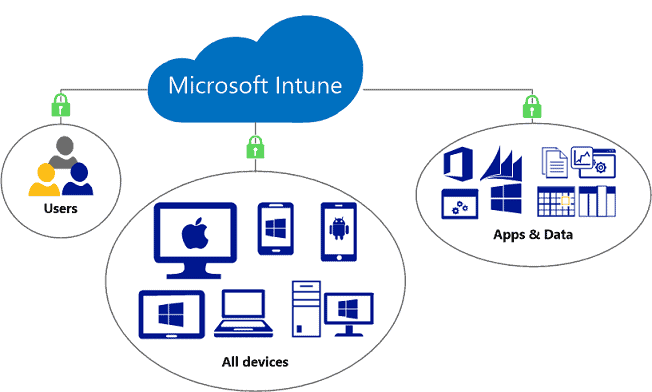
Microsoft Intune is a cloud-based device and app management tool that allows businesses to manage devices, applications and security from a unified platform.
It’s part of the Microsoft Endpoint Manager, which integrates several tools.
At a simple level, Intune helps companies answer three key questions:
- Who is accessing company data?
- From what device?
- And is the device secure and compliant?
Two Core Functions of Intune
- Mobile Device Management (MDM)
This enables IT administrators to remotely manage corporate and employee devices. This lets you set policies, send out instructions and, if necessary, lock or wipe the device.
- Mobile Application Management (MAM)
You can secure applications and data on the devices rather than the devices themselves. This is particularly useful when a business has BYOD (bring your own device) policies.
Why Intune is Essential in Modern IT Environments
Intune is not just an app – it’s part of the backbone of modern workplace security. It connects to Microsoft 365 services, identity providers and security providers, creating a central control system for IT.
Without it, businesses are managing devices blindly.
Common Challenges in Modern Workplace Device Management
When businesses don’t use Intune, they typically encounter the same issues. And these challenges are exacerbated as the organisation expands.
- Lack of Visibility: IT administrators may not be aware of the total number of devices connected to the network. This leads to hidden devices.
- Security Inconsistency: Some devices are updated; others aren’t. Some have policies, some don’t. This leaves security gaps.
- Remote Workforce Complexity: Distributed workforces mean IT cannot physically access devices, making it harder to troubleshoot.
- BYOD Challenges: Bring Your Own Device has a great appeal, but when not controlled as corporate data gets stored on personal devices.
- App Management Issues: Excessive apps in different departments lead to confusion, redundancy, and security vulnerabilities.
Not only do these issues lead to IT issues, they impact overall business productivity.
How These Challenges Impact Business Productivity
When device management is weak, employees spend more time dealing with technical issues than doing actual work.
Logging in, sharing files or joining meetings become irritating. IT support gets bogged down with incident management.
More importantly, endpoint control is a security risk. A single infected device can result in data breaches, compliance violations, or even downtime.
That’s why businesses are moving to managed endpoint management systems instead of manual control.
Introducing M365Enterprise as Your Intune Expert Partner
M365Enterprise is an Intune support partner and technology advisor for those businesses seeking to transform their technology landscape.
We don’t just deploy systems – we build entire endpoint management solutions that suit your business processes.
As a reliable Intune implementation partner, we not only implement but also ensure long-term stability, security and scalability.
We also provide structured Intune implementation services, ensuring a seamless migration and configuration.
Key Features of Microsoft Intune That Transform Workplaces
When set up properly, Intune is a formidable control tool. Here’s how the most significant features benefit businesses:
- Cloud-Based Device Control: No physical infrastructure required. All settings are in the cloud, so it’s flexible.
- Conditional Access Policies: Data can only be accessed from compliant devices. This reduces risk significantly.
- App Protection Without Full Device Control: You can protect corporate apps without controlling devices.
- Remote Actions for Devices: Lost or stolen device? IT can lock and wipe it.
- Compliance Monitoring: Devices are constantly monitored for compliance, saving time.
- Deep Integration with Microsoft Ecosystem: Integrates with Microsoft 365 apps, identity and security.
How M365Enterprise Simplifies Intune Implementation
Organisations often find it difficult to implement Intune. It’s a powerful tool, but it can be used incorrectly. We make it easy by doing it all for you.
- Step 1: IT Environment Analysis: We understand your devices, processes and security.
- Step 2: Tailor-made Design: We use Intune to match departments, roles and security requirements.
- Step 3: Policy Configuration: We set up device, application, access and compliance policies.
- Step 4: Secure Deployment: We roll out Intune across your organization in phases to avoid disruption.
- Step 5: Seamless Microsoft 365 Integration: We ensure it integrates with your Microsoft ecosystem.
- Step 6: Support and Training: We ensure your IT staff is familiar with the system.
- Step 7: Ongoing Optimization: We optimise for speed, security, and user experience.
Business Benefits of Using Microsoft Intune with M365Enterprise
When it is set up correctly, businesses experience noticeable improvements:
- Better Security Control: All devices are secure and manageable.
- Reduced IT Workload: Automation reduces repetitive manual tasks for IT teams.
- Improved Employee Experience: Faster access to applications is achieved without IT bottlenecks.
- Stronger Compliance: Industries with strict regulations can benefit from built-in compliance controls.
- Scalable IT Infrastructure: Device management scales seamlessly with business growth.
Building a Future-Ready Workplace with Microsoft Intune Strategy
One of the biggest mistakes businesses make with endpoint management is treating it like a one-time IT setup. They set up an application, configure a few policies, and assume the job is done. But the reality is that today’s workplaces don’t stay static – devices change, employees come and go, security risks emerge, and hybrid work models keep expanding.
That’s why Microsoft Intune shouldn’t be a fixed solution, but an organic part of business strategy.
When we act as an Intune implementation partner, we don’t just aim to deploy it but also plan a strategy for it. A properly designed Intune environment should evolve with the business instead of becoming outdated within a year.
Continuous Security Instead of One-Time Protection
Traditional IT setups are heavily dependent on checks – monthly audits, manual patches and fixes. That approach simply doesn’t work anymore. With Intune Microsoft, security is continuous. Devices are continually evaluated for compliance, and access is adjusted in real time.
For example:
- If a device is no longer up-to-date, access to corporate resources can be blocked
- If a user logs in from an unusual location, additional verification is triggered.
- If a policy is breached, corrective actions can be applied immediately
This shifts security from being reactive to proactive. Instead of fixing problems after they happen, businesses prevent them from happening in the first place.
Our role as an Intune support provider is to ensure not only are the policies enabled, but correctly aligned with business risk levels. Overly strict rules slow productivity, while weak rules expose data. The balance is critical—and that’s where expertise matters.
Scaling Without Increasing IT Complexity
Most IT systems fail as companies grow.
As businesses grow – adding more users, more devices, more sites – traditional IT endpoint management systems break down. IT professionals are left to configure devices, handle problems on a case-by-case basis, and respond to repetitive requests.
With a properly implemented Microsoft Intune environment, scaling becomes almost invisible.
Users can be hired with pre-set policies. Devices can be enrolled automatically. Roles can be used to assign apps. Everything becomes standardized.
This is where Microsoft Endpoint Manager comes in as the control layer of all the endpoints in the organization.
Rather than IT teams chasing devices, the system manages itself within a certain framework.
As part of our Intune implementation services, we develop scalable frameworks so companies don’t have to change their IT architecture as they scale. It’s a matter of short-term setup and long-term architecture.
Reducing Human Dependency in IT Operations
A hidden inefficiency in many companies is over-reliance on IT staff for basic tasks. Resetting passwords, installing apps, setting up devices – these are seemingly simple tasks that take a lot of time. Microsoft Intune automates many of these tasks. However, automation is not effective without well-drafted policies.
For example:
- Role-based app assignments reduce manual installations
- Self-service device enrollment reduces IT involvement
- Automated compliance actions reduce monitoring time
When done right, IT goes from “put out fires” to “plan strategy”.
This is one of the largest changes we see in businesses when working with an organised Intune implementation partner such as ourselves.
Creating a Unified Digital Workplace
Another big advantage of Intune is its integration with the rest of Microsoft ecosystem.
When configured correctly, it integrates with other identity and access management, communications, productivity and security solutions to deliver an integrated digital workplace. This avoids the need for a range of separate platforms that don’t communicate with each other.
Rather than having separate systems for devices, applications, and security, everything operates under one framework. This makes it easier to see what’s happening, minimises errors and delivers a better employee experience.
Employees don’t think about systems – they just work. And that’s the way it should be.
Final Strategic Value
Microsoft Intune isn’t about device management. It is about control, visibility, and consistency across the entire digital workplace.
But technology is not the answer. Strategy does.
That’s why companies that are successful with Intune are not the ones who simply adopt it – but the ones who use it with planning, configuration and optimization.
When you work with M365Enterprise for Intune support, you get more than deployment – you get an endpoint management strategy for the long-term that is scalable, secure and easy to manage.
Because in modern IT environments, control is not optional anymore—it is the foundation everything else depends on.
Why Choose M365Enterprise?
We aren’t just another Intune support company doing the bare minimum with the setup services. We focus on building long-term IT stability.
Here’s what makes us different:
- We custom design solutions for real business flows
- We avoid complex processes that slows teams down
- We prioritize security without reducing usability
- We provide structured Intune deployment services instead of rushed implementations
- We act as your long-term technology partner, not just a vendor
As your trusted Intune implementation partner, our mission is clear: to make your IT environment predictable, secure, and scalable.
We make sure that any Microsoft Endpoint Manager solution we implement addresses your real-world business needs – not just what’s nice on paper.
Final Thoughts
Modern workforces just can’t be managed with old device management systems anymore. As employees access the network from multiple locations and multiple devices, control becomes crucial – not optional.
Microsoft Intune gives businesses that control. But the real transformation takes place only when it is implemented properly and aligned with business needs.
That’s where M365 Enterprise comes in. We assist organizations move from fragmented device management to a more consolidated, protected and scalable endpoint environment using Microsoft Intune and the wider Microsoft 365 environment.
If your business is having device management challenges, security vulnerabilities or remote workforce control, it’s time to fix the foundation.
Partner with us at M365Enterprise today – your go-to Intune implementation partner, Intune support provider, and specialist in Intune deployment services – and together, we will create a safe and secure modern workplace. Call us at +971 50 743 7958 to book a consultation with us.