
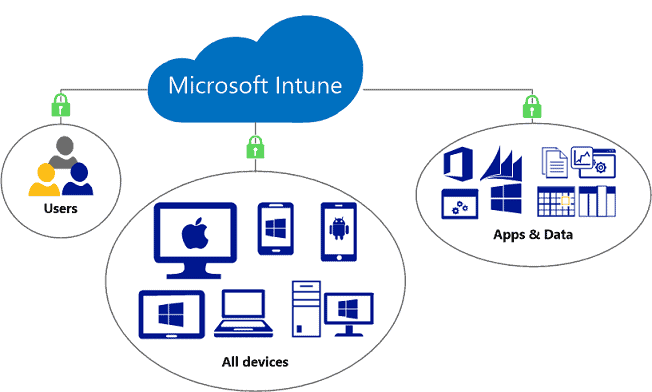
As companies begin to expand, controlling devices, apps, and information become a sloppy affair. Employees use different phones, laptops and tablets. Some work at home, others from offices. This is the point where Microsoft Intune comes to the rescue. It assists the IT teams to remain in control without slowing people down.
Microsoft Intune is a cloud-based service that enables us to control the devices, enforce security policies, and protect company data all from a single platform. Whether it’s a company-provided laptop or a personal phone used in work, Microsoft Intune ensures that everything stays safe and compliant.
In general terms, when your business is associated with various devices and sensitive information, ignoring Microsoft Intune is like leaving your office door open at night and hoping that nothing will be stolen.
What is Microsoft Intune?
Microsoft Intune is a cloud-based solution that targets mobile device management (MDM) and mobile application management (MAM). It is an important component of the Microsoft Endpoint Manager ecosystem.
Using Microsoft Intune, we are able to:
- Control such devices as smartphones, laptops and tablets.
- Regulate access to company data by employees.
- Impose security policies on all endpoints.
- Get real time compliance.
Microsoft Intune is fully in the cloud as opposed to the traditional systems that used on-premise servers. It implies less infrastructure, fewer headaches, and quicker deployment.
Why Businesses Need Intune Today
Let’s be honest – work is no longer confined to office desks. Employees log in from homes, cafes, airports and in some cases locations that IT teams are not even aware of. This is very flexible in terms of productivity but risky for security.
This is where Microsoft Intune comes in.
Rise of Remote and Hybrid Work
With remote work becoming normal, devices are no longer within office networks. Microsoft Intune helps us manage these devices securely, no matter where they are.
Increased Cybersecurity Risks
As threats in cyberspace, they are smarter. A single compromised device can lead to the exposure of an organisation. With an Intune MDM solution, we can implement encryption, password policies, and multi-factor authentication.
Bring Your Own Device (BYOD)
Workers like to work with their personal devices. Rather than prohibiting it, Microsoft Intune enables us to separate personal and business data in a safe manner.
Key Features of Microsoft Intune
It is at the stage of understanding features where things become interesting. This is what makes Microsoft Intune more than just another IT tool.
Device Management
Under Microsoft Intune management, we are able to manage company devices at a central dashboard.
- Enroll devices automatically
- Apply security policies
- Remotely lock or wipe lost devices.
This is particularly handy when employees leave the company or lose their devices.
Application Management
Not all apps are business friendly. Microsoft Intune will enable us to:
- Control which apps to be installed.
- Restrict data sharing between apps
- Secure sensitive data within apps.
Even if someone uses a personal phone, company data stays protected.
Security and Compliance
Security is where Microsoft Intune really shines.
We can enforce:
- Strong password rules
- Device encryption
- Threat protection policies
In case a device fails to comply, it is possible to block access to the company data automatically.
Integration with Microsoft Ecosystem
The fact that it can be integrated with such tools as Microsoft 365 and Azure Active Directory can be considered one of the key benefits of Microsoft Intune.
This means:
- Seamless user authentication
- Centralized identity management
- Greater control of access permissions.
Everything works together instead of feeling like separate systems stitched together.
How Intune Works in Real Life
Let’s break it down with a simple example.
An employee joins your company. Instead of handing over a device and hoping for the best, we use Microsoft Intune to:
- Enroll the device
- Automatically install necessary apps.
- Implement company security policies.
- Monitor compliance
If the employee tries to install risky apps or disable security settings, Microsoft Intune can block access instantly.
Now suppose that you had to do all this manually with 100 or 500 employees. Exactly. Not happening.
Microsoft Endpoint Manager Intune: A Unified Approach
The combination of Microsoft endpoint manager Intune brings everything under one roof.
We are no longer dealing with devices, apps, and users separately but rather we have a single platform where:
- Device policies
- App controls
- Security rules
…are all managed in one place.
This minimizes complexity and provides IT teams with increased visibility.
Benefits of Using Intune MDM Solution
Better Security
Using an Intune MDM solution, we are able to be strict and non-intrusive. Even in case devices are lost or stolen, data remains secure.
Cost Efficiency
No infrastructure or various tools are required. Microsoft Intune makes it all a single platform, which makes it more cost-effective to operate.
Improved Productivity
Employees don’t need to struggle with manual setups. Devices are ready to use without any customization to Microsoft Intune management.
Scalability
Whether you have 10 workers or 10,000, Microsoft Intune expands at a very easy pace, without a huge modification.
Common Use Cases for Intune
Microsoft Intune is used differently by businesses of various sectors.
- Corporate Device Management: Keeping laptops and mobile devices owned by the company safe.
- Remote Workforce Support: Making sure that employees are able to work safely anywhere.
- Compliance Enforcement: Automated policies to meet regulatory requirements.
- Data Protection: Preventing unauthorized access or data leaks using app-level controls.
Challenges Without Intune
Skipping Microsoft Intune might seem okay at first – but problems show up quickly.
- No device control of employees.
- Increased risk of data breaches
- Slow and laborious IT operations.
- Inability to see into compliance of the device.
Basically, more stress for IT teams and more risk for the business.
Advanced Capabilities of Intunes Microsoft
Having the essentials in place, Microsoft Intune provides more control than many businesses dive into. These enhanced functions are where efficiency and security improvements happen.
Conditional Access Policies
Microsoft Intune allows us to specify access control to what, and on what terms.
For example:
- Only compliant devices should be allowed access.
- Block unknown locations login attempts.
- Enforce multi-factor authentication of sensitive data.
This means that even if login credentials are compromised, unauthorized access is still blocked.
Zero Trust Security Approach.
Security in modern times is not about the trust of users within a network. The Zero Trust model assumes that all access requests should be authenticated.
With Microsoft Intune management, we are able to:
- Always check the identity of the user.
- Check device health before granting access
- Limit access according to risk level.
This makes Microsoft Intune a key part of a strong cybersecurity framework.
Automated Device Provisioning
Manual installation of devices is time consuming. We can automate the whole process with Microsoft Intune. New devices can be:
- Ready-to-use company policies.
- Automatically enrolled in the system.
- Ready to use directly out of the box.
This saves hours of IT work and reduces human error.
Remote Troubleshooting and Support.
When employees have problems, IT teams need not have physical access to devices. With Microsoft Intune, we can:
- Diagnose problems remotely
- Push updates instantly
- Find solutions to problems promptly.
It comes in handy particularly in the companies that have distributed teams.
Intune vs Traditional Device Management
Before cloud solutions like Microsoft Intune, companies used on-premise tools. But those systems were heavy, slow, and hard to maintain.
Traditional Systems
- Required physical servers
- Needed constant maintenance
- Limited remote management
- Slow to scale
Microsoft Intune Approach
With Microsoft Intune, everything is:
- Cloud-based
- Easily scalable
- Accessible from anywhere
- Faster to deploy
This is the reason why an increasing number of organizations are migrating to Microsoft endpoint manager Intune solutions.
Industries That Benefit Most from Intune
Although nearly all business can use Microsoft Intune, certain industries are more advantageous because of the rigorous security and compliance requirements.

- Healthcare: Maintaining confidentiality of patient data is important. Intune MDM solution assists in the imposition of stringent access controls and device security.
- Finance: Banking and other financial institutions handle sensitive information on a daily basis. They can avoid data leakage and unauthorized access with the help of Microsoft Intune management.
- Education: Schools and universities have numerous devices among students and employees. Microsoft Intune can streamline control over the devices and make their use secure.
- Retail and E-commerce: With mobile POS systems and distributed teams, Microsoft Intune helps maintain secure and efficient operations.
Best Practices to implement Intune
It is not sufficient to set up Microsoft Intune. We have to do the right thing in order to achieve maximum outcomes.
- Start with Clear Policies: Define what is allowed and what isn’t. This includes:
- Device usage rules
- App permissions
- Data access guidelines
- Use Role-Based Access
All employees do not require the same access. Using the Microsoft Intune management, we are able to assign role-based permissions.
- Monitor Regularly
Security is not a one-time setup. Continuous monitoring ensures that devices are up to standards.
- Train Employees
Even the best system is useless when the users don’t adhere to rules. Educating employees about security practices is crucial.
Future of Endpoint Management with Intune
Technology continues to change and Microsoft Intune is changing with it.
We already observe tendencies such as:
- AI-driven security insights
- Automated threat detection
- Smarter compliance monitoring
Due to the increased digitization of businesses, such tools as Microsoft endpoint manager Intune will be even more significant.
Ignoring this shift is not just risky—it puts businesses at a serious disadvantage.
Why Choose Us
At M365, we don’t simply install Microsoft Intune – we ensure that it will actually work for your business. Each organization has its unique needs and a universal arrangement is hardly effective. Before configuring your Microsoft Intune management environment, we take the time to familiarize ourselves with your workflows and device usage, along with your security concerns.
We also make sure that we integrate easily with your existing systems, such as the Microsoft endpoint manager Intune settings. Right from the initial setup to ongoing support, we make sure you maximize the use of your Intune MDM solution without the need to overload your internal departments.
Conclusion
Managing devices and securing data doesn’t have to be complicated. With Microsoft Intune, we get a powerful yet simple way to control devices, protect information, and support modern work environments.
Microsoft Intune administration can offer the freedom and safety that small companies and large corporations demand to transact their business effectively. It can be used together with Microsoft endpoint manager Intune to have a complete endpoint management solution.
If your business is still relying on outdated methods or scattered tools, switching to an Intune MDM solution is not just a good idea—it’s a necessary move.
Ready to dominate your devices and safeguard your business the right way?
Contact us today and discuss the ways in which Microsoft Intune can change your IT operations. Together, let’s create a smarter, safer and more efficient place to work. Call us at +971 50 743 7958 to book a consultation with us today.